Managing prepared questionnaires
Adjusting order
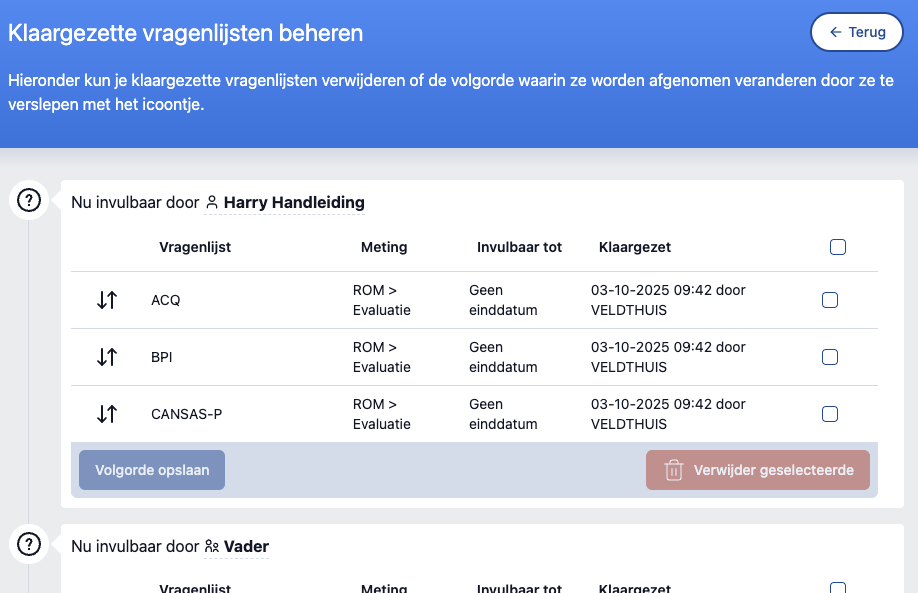
The order in which the questionnaires are offered after the respondent logs in is the same order in which they appear in the table. You can change this by dragging rows using the icon in the left column, and then clicking the "Save order" button.
Removing pending questionnaires
To ensure that certain questionnaires are no longer administered when the respondent logs in with their code, check the boxes in the right column for the relevant questionnaires (to select all you can click on the top checkbox in the header). Then click on the "Remove selected" button.
RoQua then asks you to indicate what the reason for removal is.
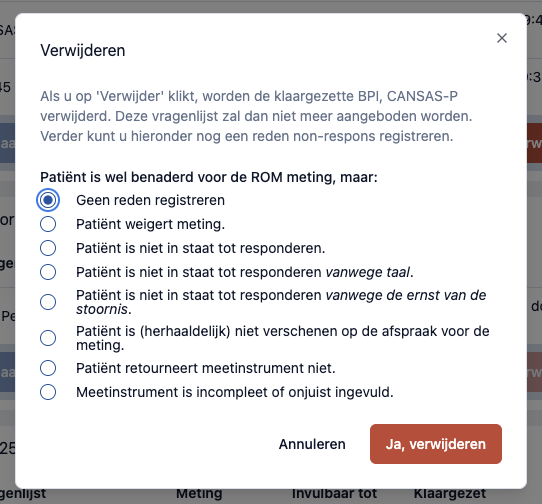
Choose an appropriate reason and click "Ok" to save it. When you leave the option "No reason to register." selected and click "Ok", the pending questionnaire is removed without saving a reason. No "non-response" line will then appear in the list of recent events for the file.