
Preparing questionnaires
At the top of every screen in RoQua is the “New Measurement” button.

At the bottom is the list of all protocols configured within your organization. Within a protocol there can be two things:
- Manual measurements: this is where you manually select and prepare questionnaires once. When preparing, you can choose an invitation to send, and optionally a reminder.
- Automatic protocols: TODO
Search and filter
Section titled “Search and filter”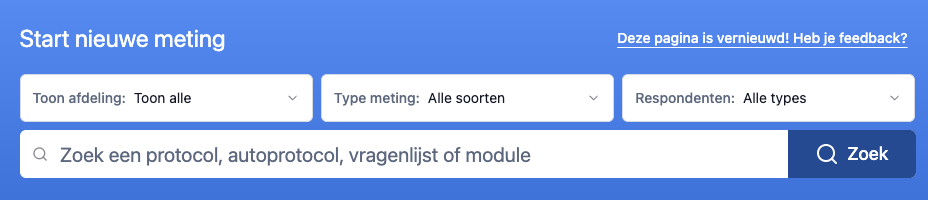
To quickly find the right protocol you can filter the list in different ways:
Department
Section titled “Department”With this filter you can limit the protocols to a specific department. This setting is saved to your user profile and is also used on other pages within RoQua.
Measurement type
Section titled “Measurement type”Here you can filter by type of measurement:
- All: shows all available protocols
- Auto-protocols: only protocols that automatically prepare questionnaires
- Manual measurements: protocols where you manually select and prepare questionnaires
- Expert modules: special modules such as PETRA
Respondents
Section titled “Respondents”Filter by the type of respondent for whom the questionnaires are intended, for example patient, parent, partner or teacher.
Free text search
Section titled “Free text search”You can also search by text. The system then searches the following fields:
- Protocol name
- Measurement name
- Questionnaire name
When you search for text, two things happen:
- All protocols automatically expand, so you can immediately see what’s in them
- If a questionnaire name matches your search query, we show a list of the questionnaires that were found. This way you know exactly why a certain protocol appears in the results.