Overview
This is normally the page you arrive at when you open RoQua. On this page you can see what still needs to be completed, what has been prepared, and what has recently happened for this client.
Pending questionnaires
At the top of the overview page, each respondent is shown which questionnaires are ready to be completed and what the corresponding login code is.
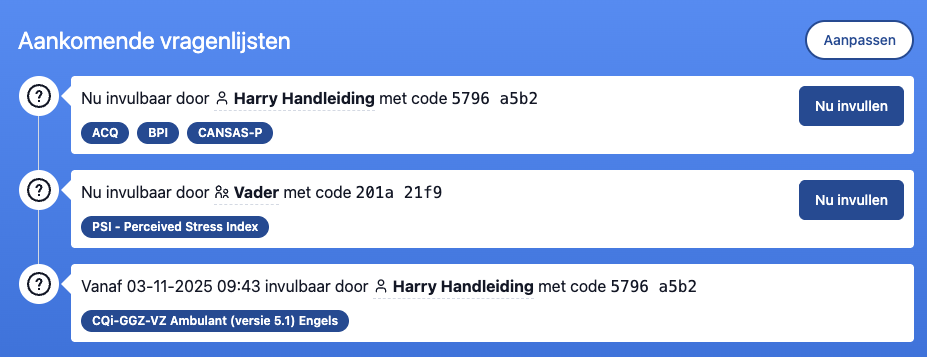
- The order in which the questionnaires are listed here is also the order in which the respondent must complete them.
- Don't want to administer questionnaires anymore, or change the order? Via the "Adjust" button at the top you will reach a page where you can do this. There is also more information there, such as who prepared the list and on what date.
- In RoQua it is also possible to prepare questionnaires in advance for later. You will also see those here.
Active automatic protocols
If there are automatic protocols active for this client, you will see them here. Automatic protocols ensure that questionnaires are automatically prepared at regular intervals. In this section you can see which protocols are running and when the next administration is scheduled.

Available on own initiative
If configured, you can see here which questionnaires the client can complete on their own initiative. These questionnaires do not need to be prepared by a healthcare provider, but can be started by the respondent themselves when they want.

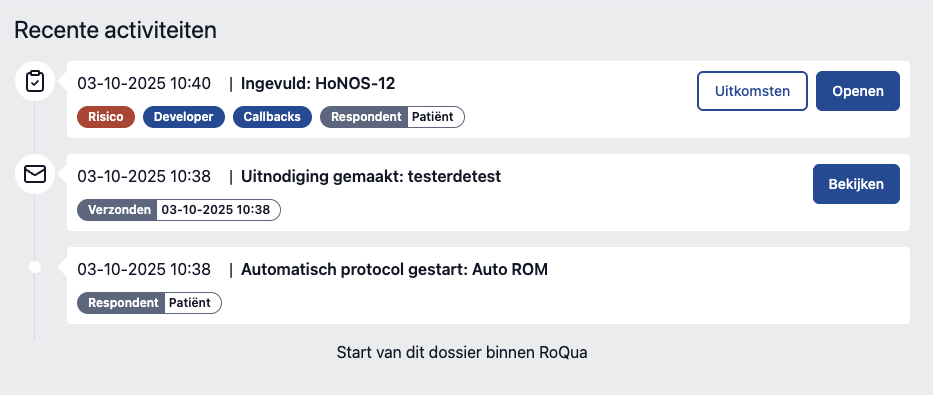
Recent activities
This section shows a chronological list of all events for this client. Here you can see, for example, which questionnaires have been completed, when invitations have been sent, and when reports have been generated.